Your holiday lets. Your business. One Daybook.
Daybook puts your bookings, your numbers, your cleaner and the things you need to remember in one place. Open it in the morning and know where you stand.
Free for 14 days, no card. Then £15 a month.

Airbnb shows you Airbnb. That’s not your whole business.
Airbnb, Booking.com, Vrbo, your own direct bookings: however guests find you, there’s still one business to run.
The booking sites bring you guests, and each shows you its own bookings. Daybook brings every booking into one view, whichever site it came from, for the person running that business. That’s you.
Made for hosts with one to five places.
Every morning, one place to look.
Without Daybook
- Open Airbnb to see who’s arriving.
- Check Booking.com for anything new.
- Look through your notes for what you meant to do.
- Wonder whether the cleaner knows.
With Daybook
- Who’s arriving, at every place.
- What’s new since you last looked.
- Your reminders, on the day they’re for.
- Whether your cleaner knows.
Every booking, in one calendar.
Who’s arriving tomorrow? Which place is changing over? Was that one Airbnb or Booking.com? Your places sit side by side, each booking coloured by where it came from.
Take a booking on Booking.com and, if your calendars are linked, Airbnb blocks those nights. The dates are covered. But a blocked night doesn’t tell you who is arriving, which booking it is, or what it earns you.
Blocked
Five nights, taken by a booking somewhere else. No name, no site, no figure.

What Daybook adds
- The guest’s name
- The site it was booked on
- The place
- The nights
- What it earns you after commission, once the booking email has come
Daybook reads the calendar link each site gives you, and checks every calendar every few minutes. Forward your booking emails, or upload your past bookings, and each stay gets the guest’s name and what it earns you. Add a direct booking by hand and it sits there with the rest.
If two bookings land on the same nights, Daybook tells you, and what to do about it.
Already on a channel manager? Daybook reads its calendar too, and adds what a channel manager doesn’t: your numbers against earlier years, your reminders, your cleaner, and Today.
Know what needs you today. And what doesn’t.
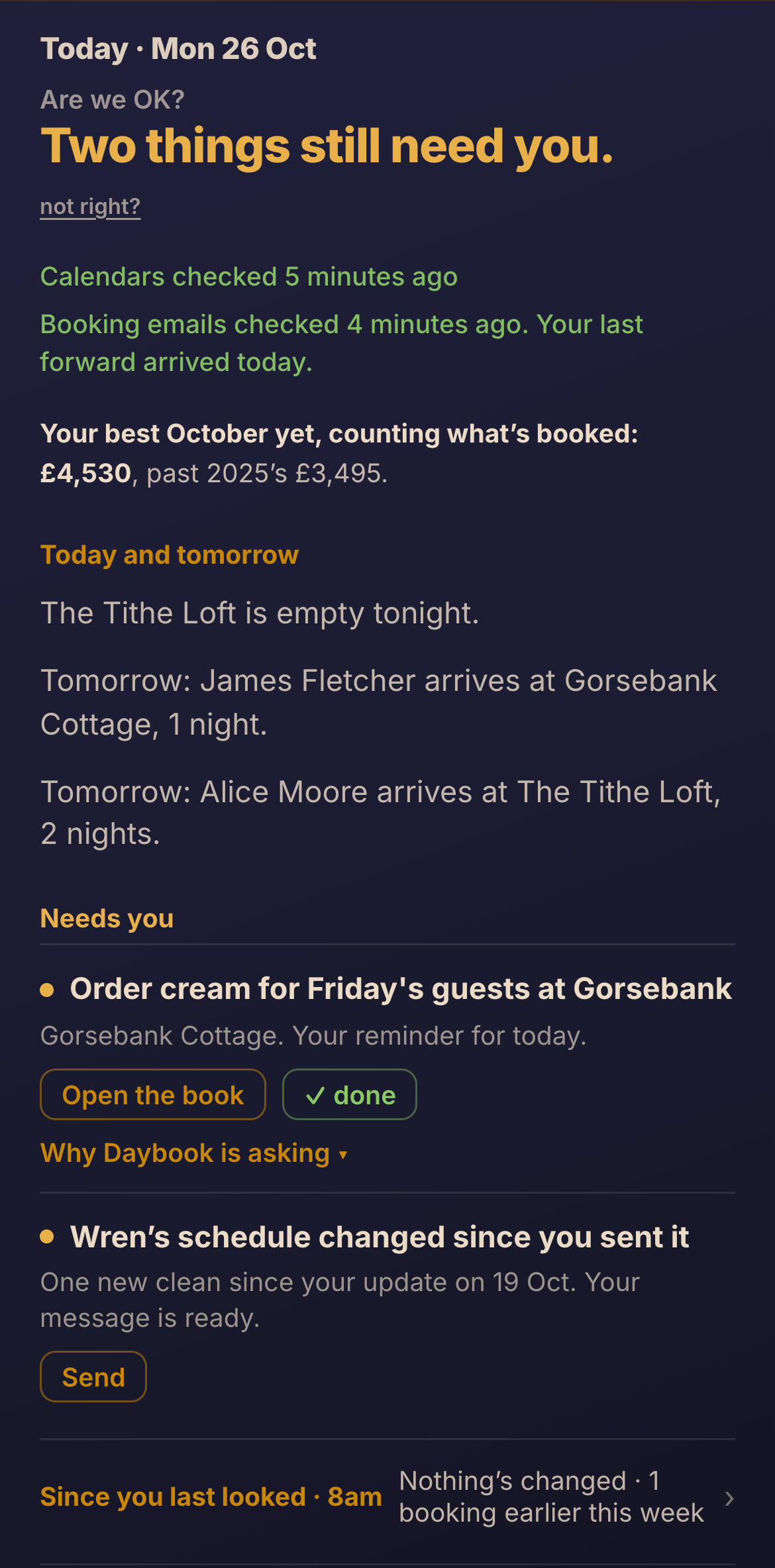
The first line says how many things need you, and the rows underneath name them. Then who leaves and who arrives, then what has changed since you last looked.
When nothing needs you, it says that, and you can put the phone down.
It says when it couldn’t read a calendar, rather than leaving a gap.
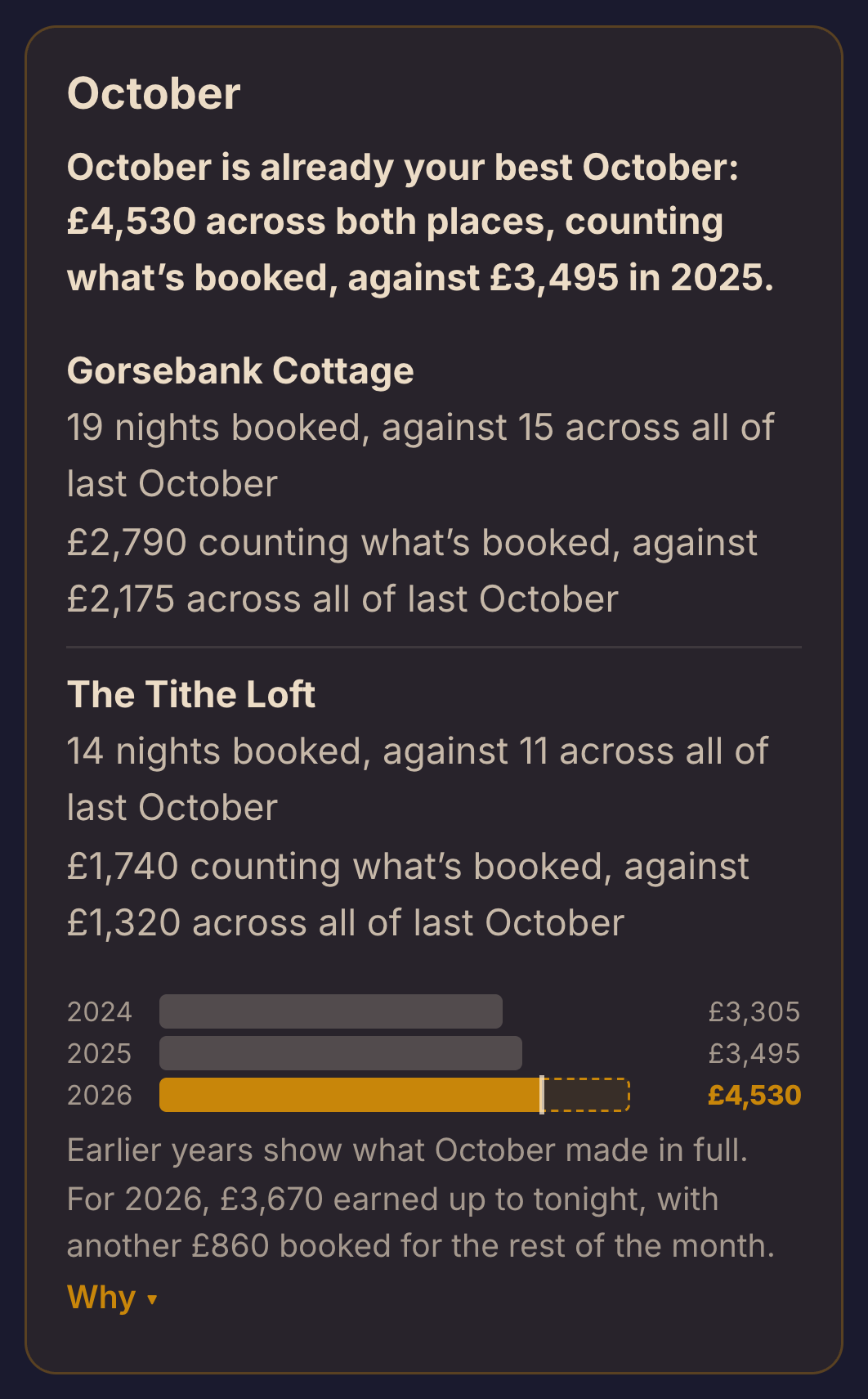
A busy month isn’t always a good month.
October felt good. But was it better than last October? Numbers puts each month beside the same month in earlier years, using what each stay earns you after the sites’ commission, and says in one sentence where it stands.
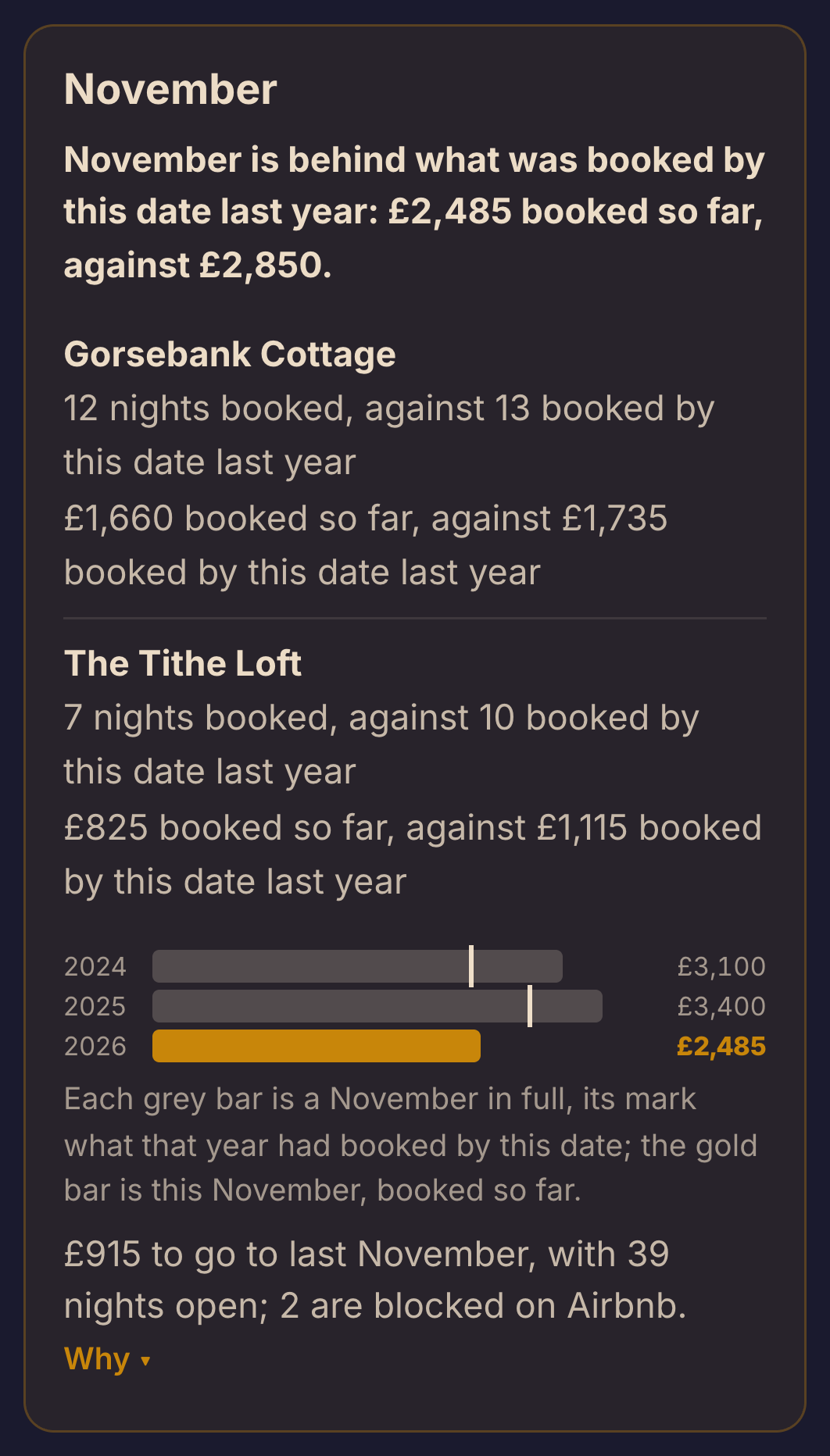
Next month gets the same card as a tracker: what is booked so far, against where last year stood on the same day.
Every figure says what it stands on, and when a night has no income figure yet, Numbers says so and what to do about it: usually, forward the booking email.
Stop keeping everything in your head.
Cream for Friday’s guests. More milk. A pet fee to check. The Christmas decorations up before the first December arrival. None of it is difficult. There’s just a lot of it.
-
You remember something.
In the car, or in the supermarket, or at the end of the day.
-
You tell Daybook.
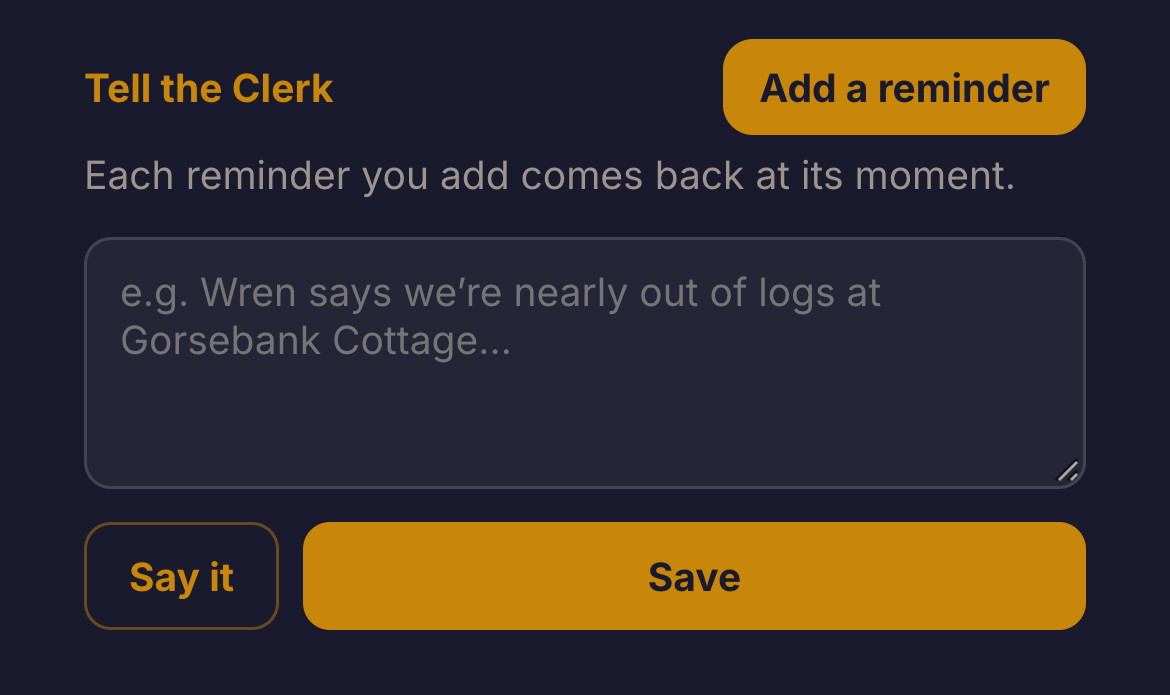
Tap Add a reminder and say it or type it, in your own words.
-
It keeps it with the place or the booking.
The Clerk works out which place you mean from your words (one tap changes it), and files it with the day it’s for. A reminder tied to a booking moves when the booking moves.
-
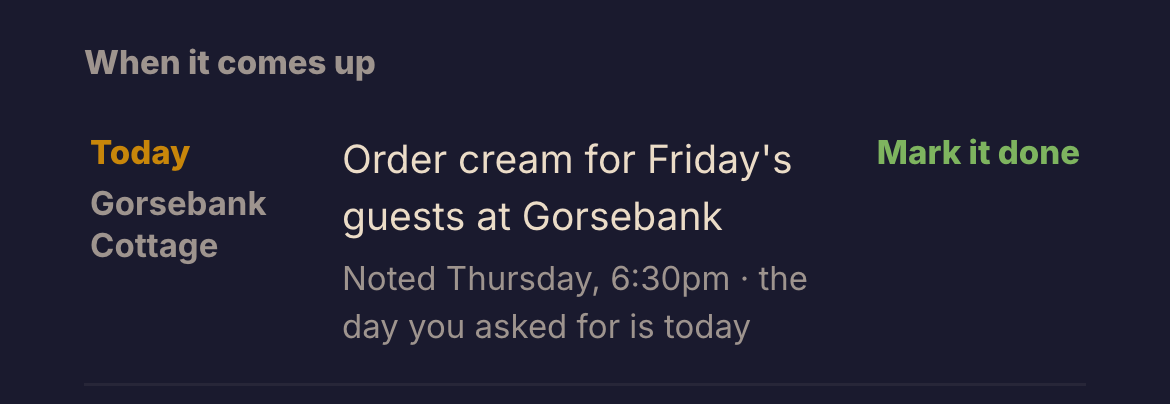
It comes back on the day.
On Today, by name, with the place.
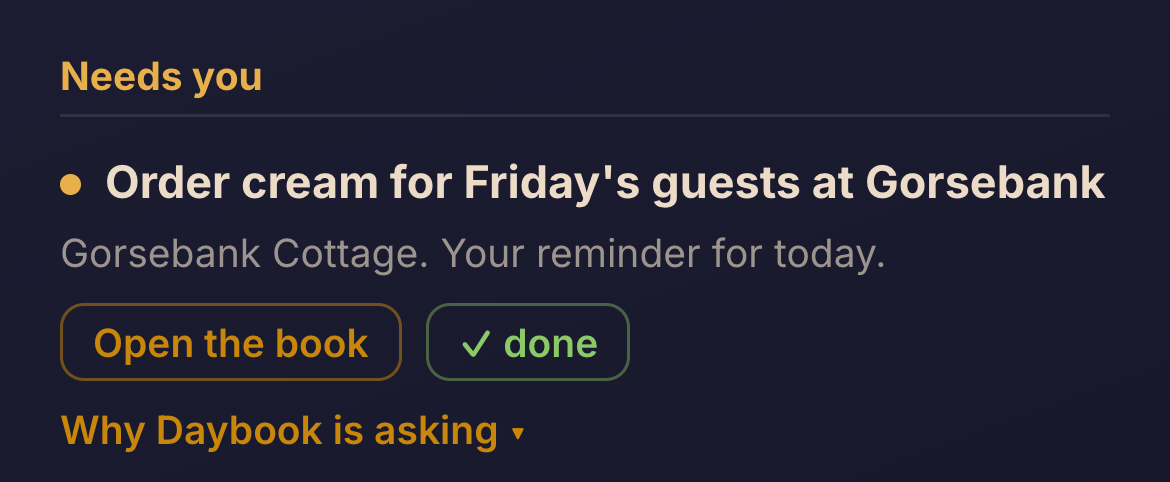
-
You tick it.
It stays until you do, however old, and is then kept as history.
The Clerk also answers a fixed list of twelve questions about your bookings and your figures, such as How is this month going? Each is answered from your own records and says what it is based on.
The next clean, ready to send.
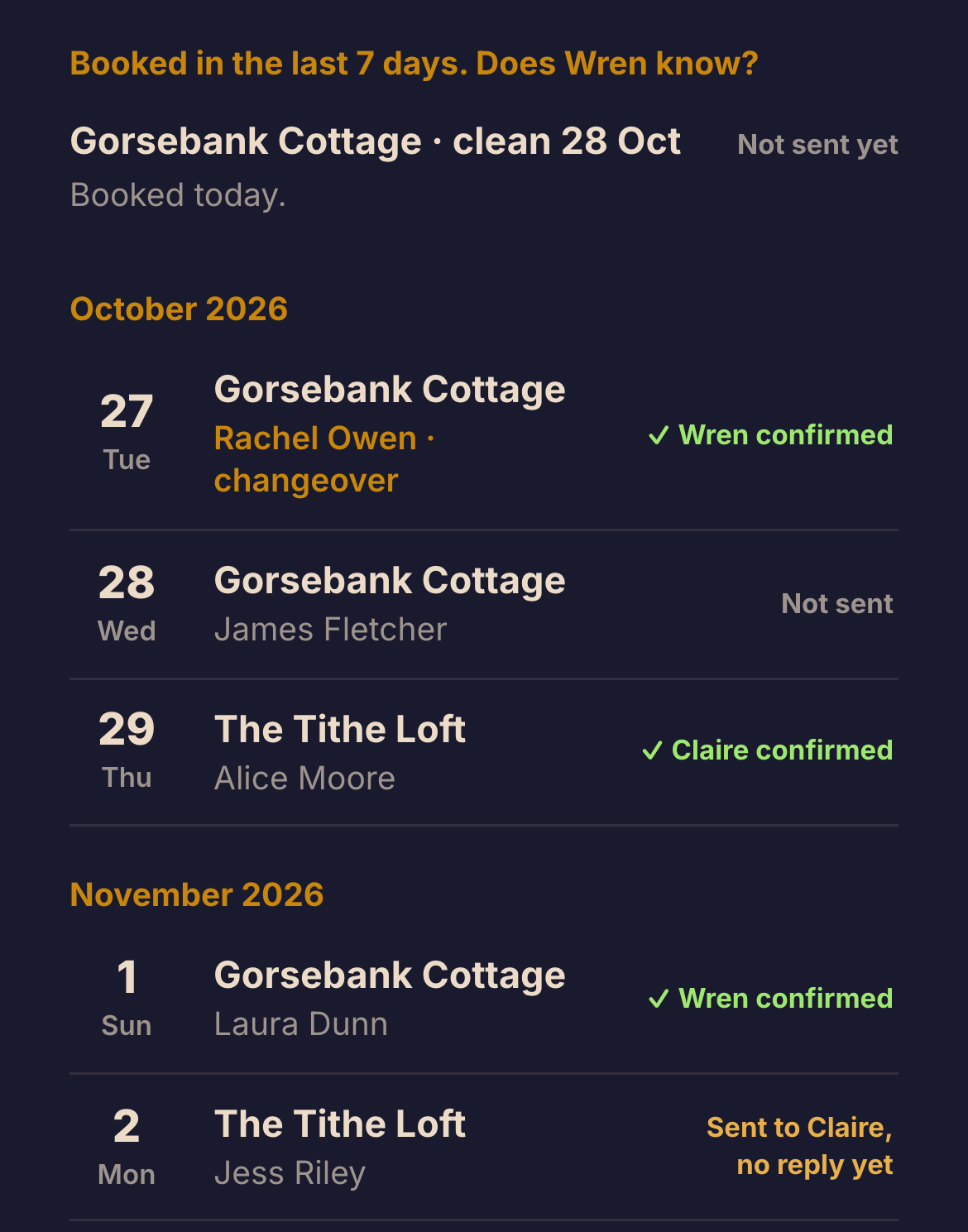
When a booking comes in, Daybook writes the message for your cleaner: which place, which day, what time the guests leave, and a link to their own page.
Hi Wren, here are the cleans for the next two weeks:
Tue 27 Oct: Gorsebank Cottage, guests leave by 11am. Changeover, the next guests arrive the same day
Wed 28 Oct: Gorsebank Cottage, guests leave by 11am
Sun 1 Nov: Gorsebank Cottage, guests leave by 11am
The message Daybook wrote for the made-up host’s cleaner, as words, with the cleaner’s own link left off.
You send it from your own phone, in WhatsApp or as a text, so it comes from you. Your cleaner opens their own page from the link in your message and taps to confirm, or to mark a clean done. When they tap Confirm, your board shows it.
Daybook says where each clean stands: the message prepared, sent with no reply yet, or confirmed. So you know whether your cleaner knows.
I built Daybook because I needed it myself.
I run holiday lets in Wiltshire. I know what it’s like to be in the car trying to remember who’s arriving, to get to the supermarket and realise I’ve forgotten the cream, or to wonder whether I’ve done enough about the gaps in next month’s calendar.
I wanted one place that put the business back together: the bookings, the numbers and the everyday things that need doing. Useful, without turning a small hosting business into a software project. So I started building Daybook.
Anthony Williams. If you email hello@daybookforhosts.com, I read it.
You’re already paying the platforms. This is for you.
Airbnb and Booking.com find you guests. Daybook helps you look after the business you’ve built around them.
Less checking
Your bookings from every site, and what needs you today, without opening each site in turn.
Fewer things forgotten
Reminders and changeovers organised around your bookings: each reminder back on its day, each clean’s message ready to send.
A clearer view of what you’ve earned
Each month against the same month in earlier years, and where next month stands against last year.
One plan with everything in it. No tiers and no add-ons, and no suite built for a hotel group.
Free for 14 days, no card. Then £15 a month, everything included.
The first 50 hosts to pay are Founding Hosts and keep £15 a month for as long as they stay with Daybook: not a discount now, a promise that their price never rises.
Nothing is charged unless you decide to keep Daybook. Pricing
What hosts ask first
Does Daybook replace Airbnb or Booking.com?
No. They bring you guests and run the bookings on their own sites. Daybook reads their calendars and the booking emails you forward, and puts the whole business in one place.
Will Daybook change anything on Airbnb or Booking.com?
No. It reads your calendars and never changes your availability or your prices on Airbnb, Booking.com or Vrbo.
Keep the calendar links you already have between the sites. Also paste Daybook’s calendar link into each site, so a booking you take directly blocks every site. Each site reads it every few hours.
Is Daybook a channel manager?
No. It doesn’t set your prices or your availability on the sites, and it doesn’t message guests. If you need that, choose a channel manager; Daybook can read its calendar too. If what you want is a clear view of your own business, start here.
What happens if two bookings land on the same nights?
Daybook tells you, and what to do about it. It checks every calendar every few minutes, so it can tell you as soon as both bookings are on the calendars.
Does it work with direct bookings?
Yes. Add a direct booking by hand and it sits on your calendar with the rest, marked Direct. Paste Daybook’s own calendar link into each site and those nights are blocked there too, the next time each site reads it (every few hours).
Will Daybook know my income by itself?
Not from the calendars: a calendar link carries dates only. Forward your booking emails and each stay gets the guest’s name and what it earns you. Upload your past bookings and Numbers can compare years. Booking.com’s emails show the guest’s price, so you tell Daybook once how Booking.com pays you and it works out the rest.
Numbers always says which nights it doesn’t have a figure for yet, and what to do about them.
Do I need to change how I take bookings?
No. Keep taking bookings exactly as you do now. Daybook reads your calendars and the emails you forward; it doesn’t sit between you and your guests.
How long does setting up take?
Start with one calendar link and add the rest when you’re ready. Anything you skip waits as one line until you come back to it. What setting up asks for
What happens when the free trial ends?
You choose whether to keep Daybook at £15 a month, and give a card only then. If you don’t, you aren’t charged anything, because we never took a card, and on day thirteen, if you choose not to keep it, you're offered another 7 days first, no card needed. After that, Daybook closes until you keep it. Everything is kept as you left it, so if you come back later it is all still there. A guest already on a stay keeps their guide until they leave, and a cleaner keeps their page for the cleans you’ve already sent them. More about paying
Can I stop paying later?
Yes, whenever you like. For now, email hello@daybookforhosts.com and it is stopped for you.
Who can see my guests’ details?
You, and no one else at Daybook. Your records are stored in the EU; the privacy page lists the companies that store them.
See your own bookings in Daybook.
Start with one calendar link and add the rest when you’re ready.