Everything in its place, without running your business differently.
Daybook brings together what you already use to run your holiday lets. Start with your bookings; add the rest as it becomes useful.
Bring your bookings together.
Paste the calendar link each site gives you: Airbnb, Booking.com, Vrbo, a channel manager such as Hosthub, or your agency’s. They sit in one calendar, your places side by side, each booking coloured by where it came from.
A calendar link carries dates only. Forward your booking emails to in@daybookforhosts.com and each stay gets the guest’s name and what it earns you. Upload your past bookings once, and Numbers has years to compare.
Take a booking directly and add it by hand. Daybook only reads your calendars; it never changes anything on the sites. Keep the calendar links you already have between the sites. Also paste Daybook’s calendar link into each site, so a booking you take directly blocks every site. Each site reads it every few hours.
Daybook checks every calendar every few minutes. If two bookings land on the same nights, it tells you, with what to do.
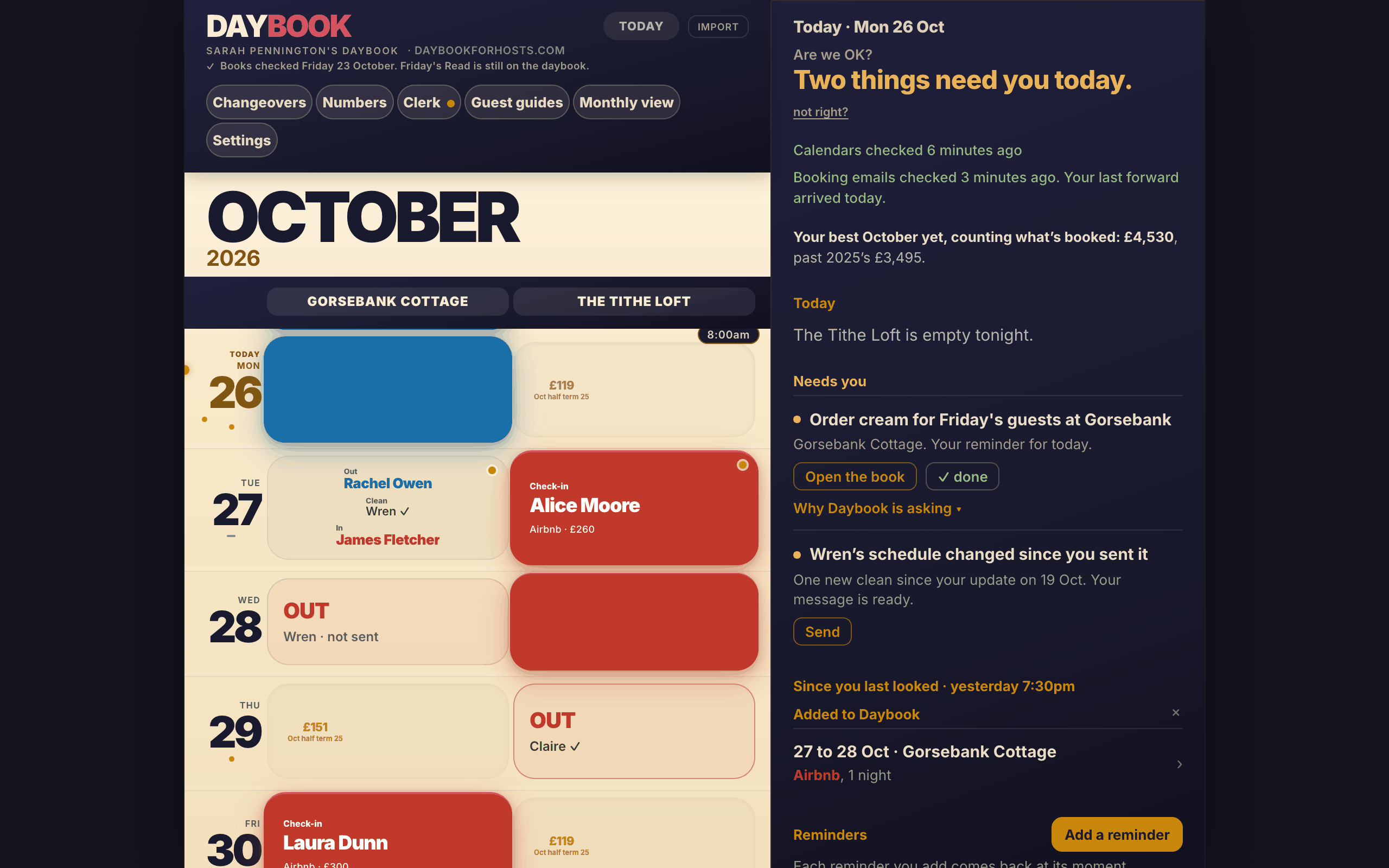
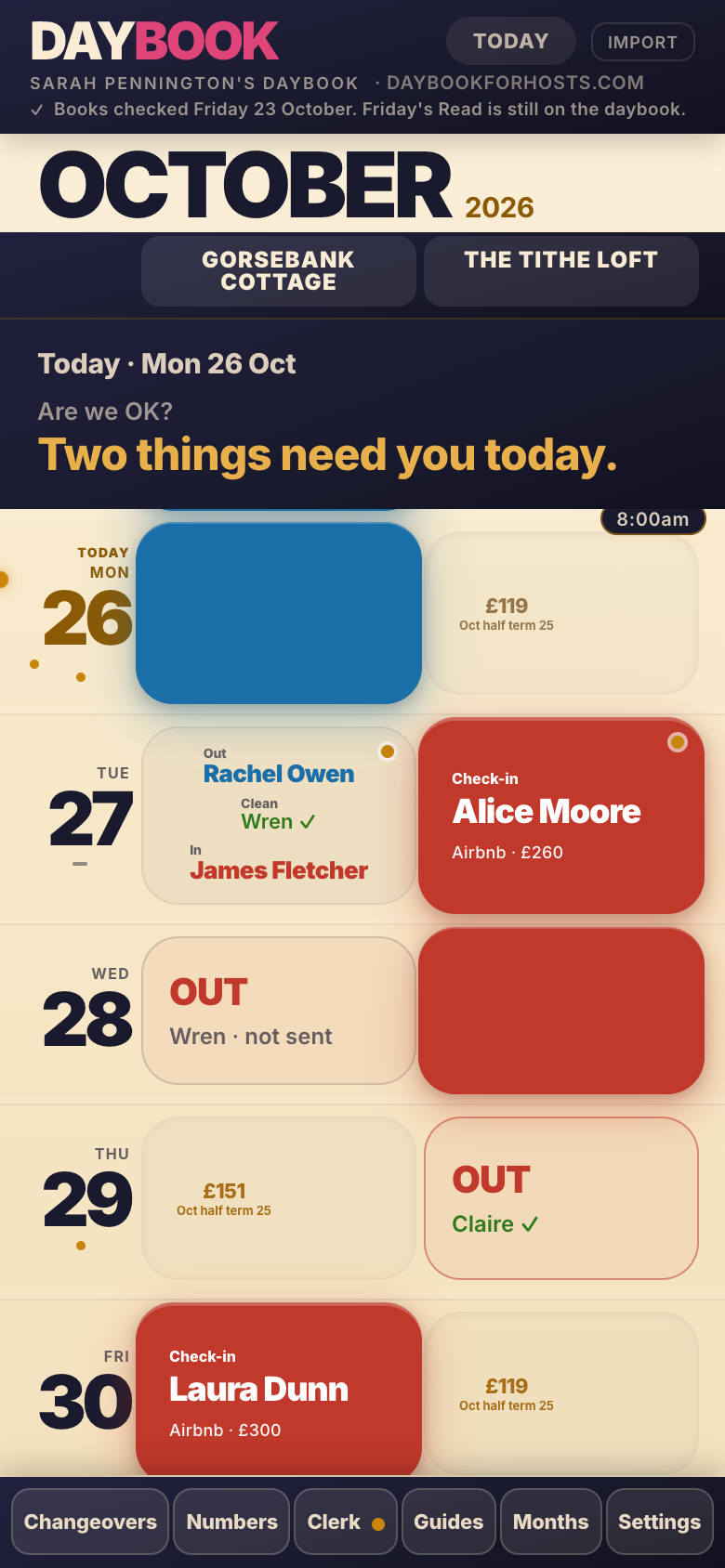
Open Today and get your bearings.
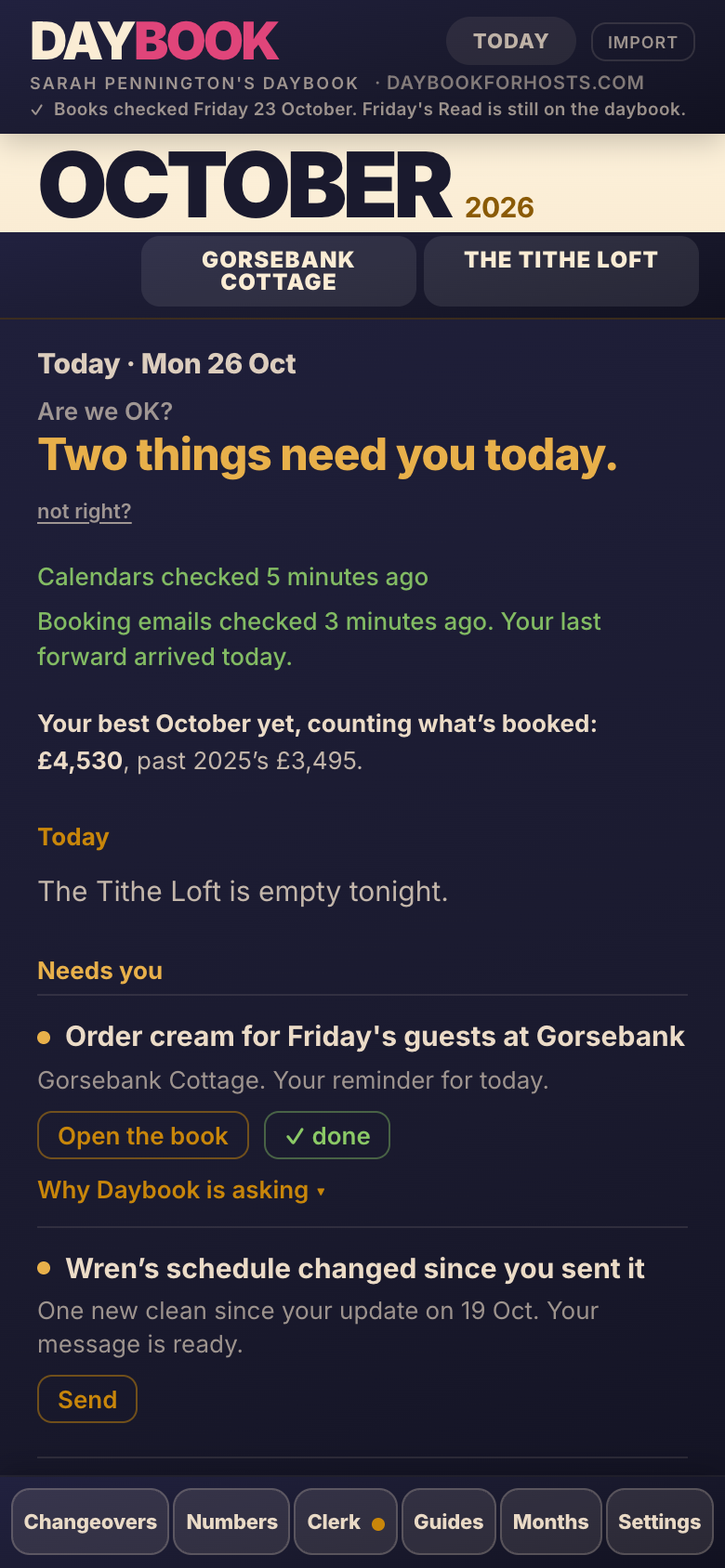
The first line says how many things need you today, and the rows underneath name them. Then who leaves and who arrives, with your cleaner’s state, then what has changed since you last looked.
Only what is due today is counted. A reminder you left yourself, a booking another site hasn’t blocked yet, a cleaner who hasn’t been told: each is one line, with the button that deals with it. When nothing needs you, it says so.
At the bottom sits Double check dates: before you say yes to a direct booking, it checks every calendar for those nights.
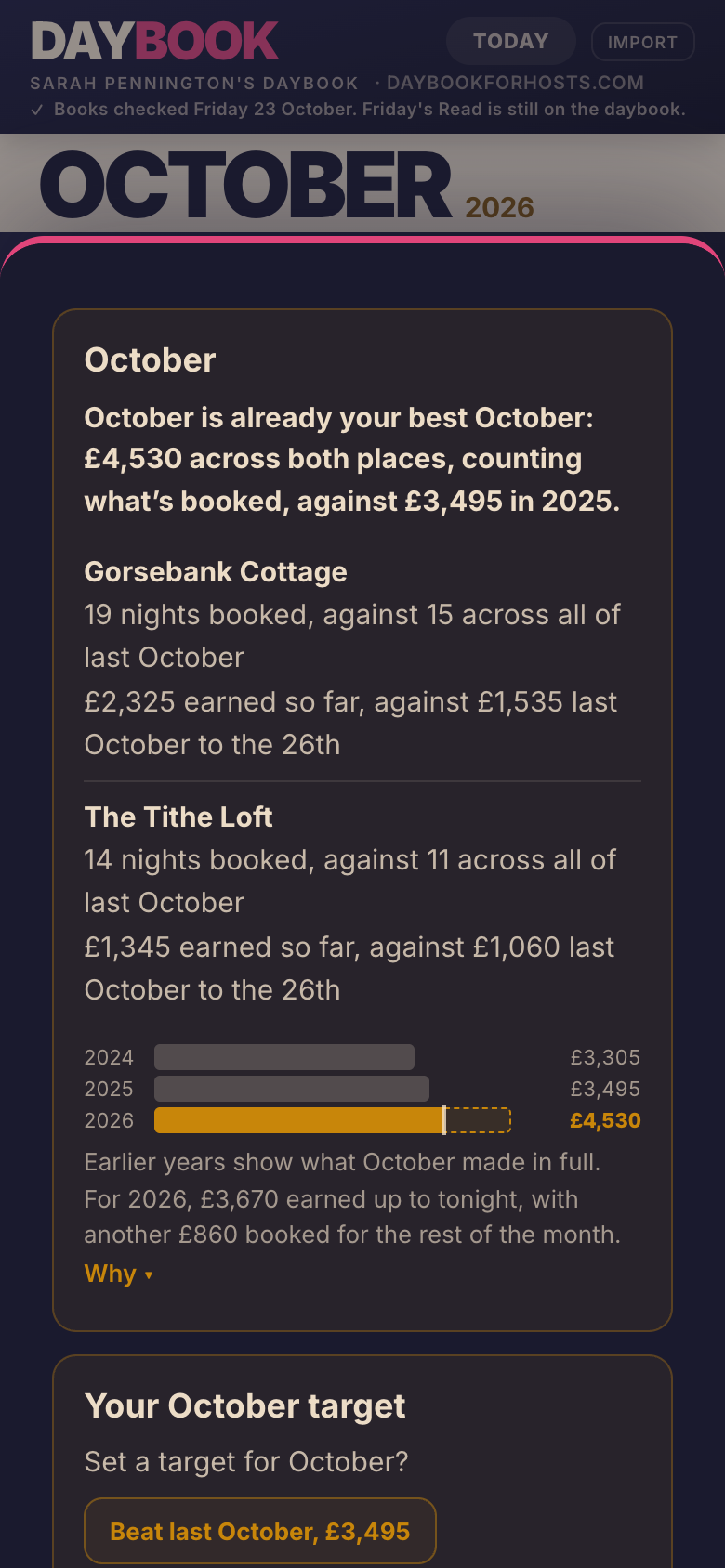
Understand your numbers.
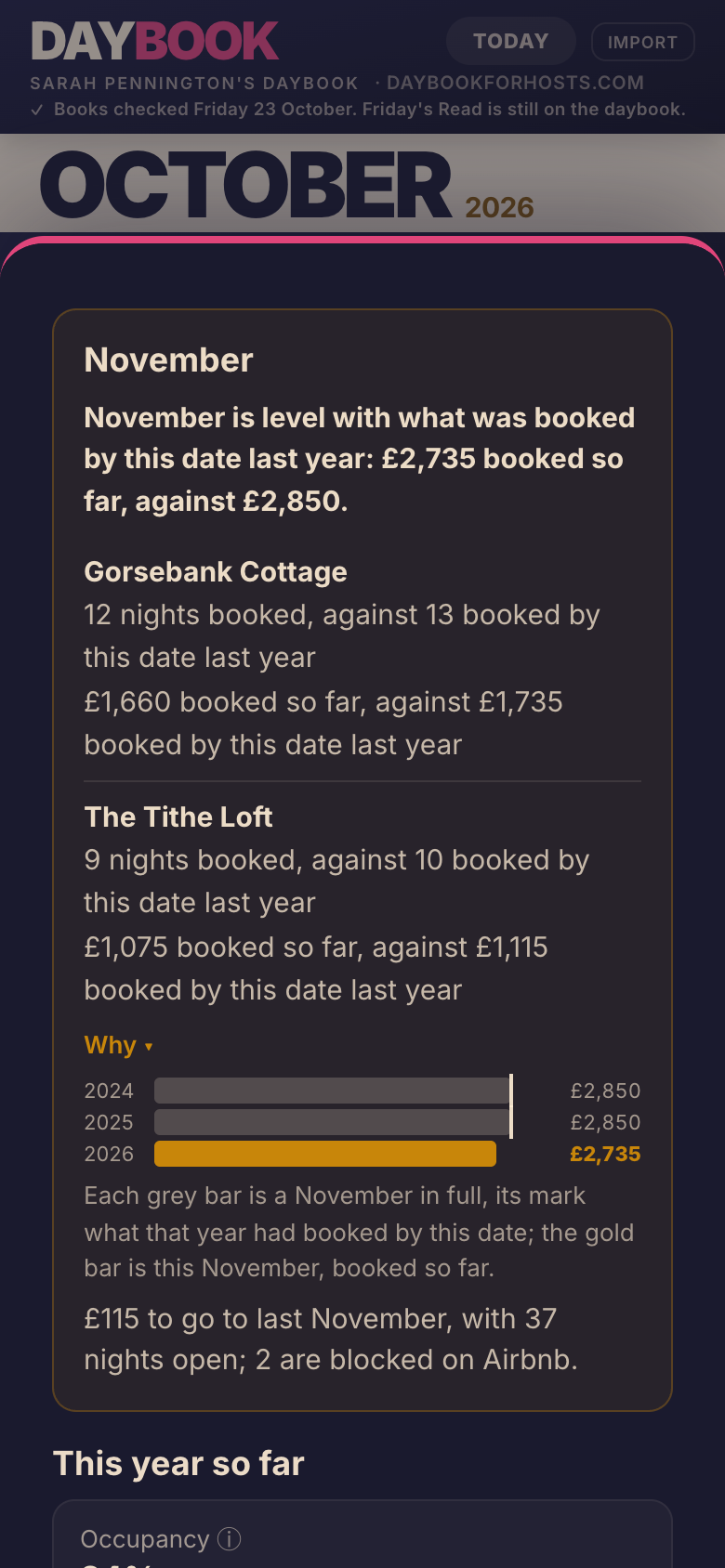
Each month sits beside the same month in earlier years, with the verdict first, each place its own row, and the bars in sight. Next month is a tracker: what is booked so far against where last year stood on the same day.
Every figure is what a stay earns you after the sites’ commission, and says how many nights it stands on. A night with no income figure yet is named, with what to do: usually, forward its booking email.
Daybook never tells you what to charge. It shows you what your nights have earned, and leaves the price to you.
Put the little things somewhere.
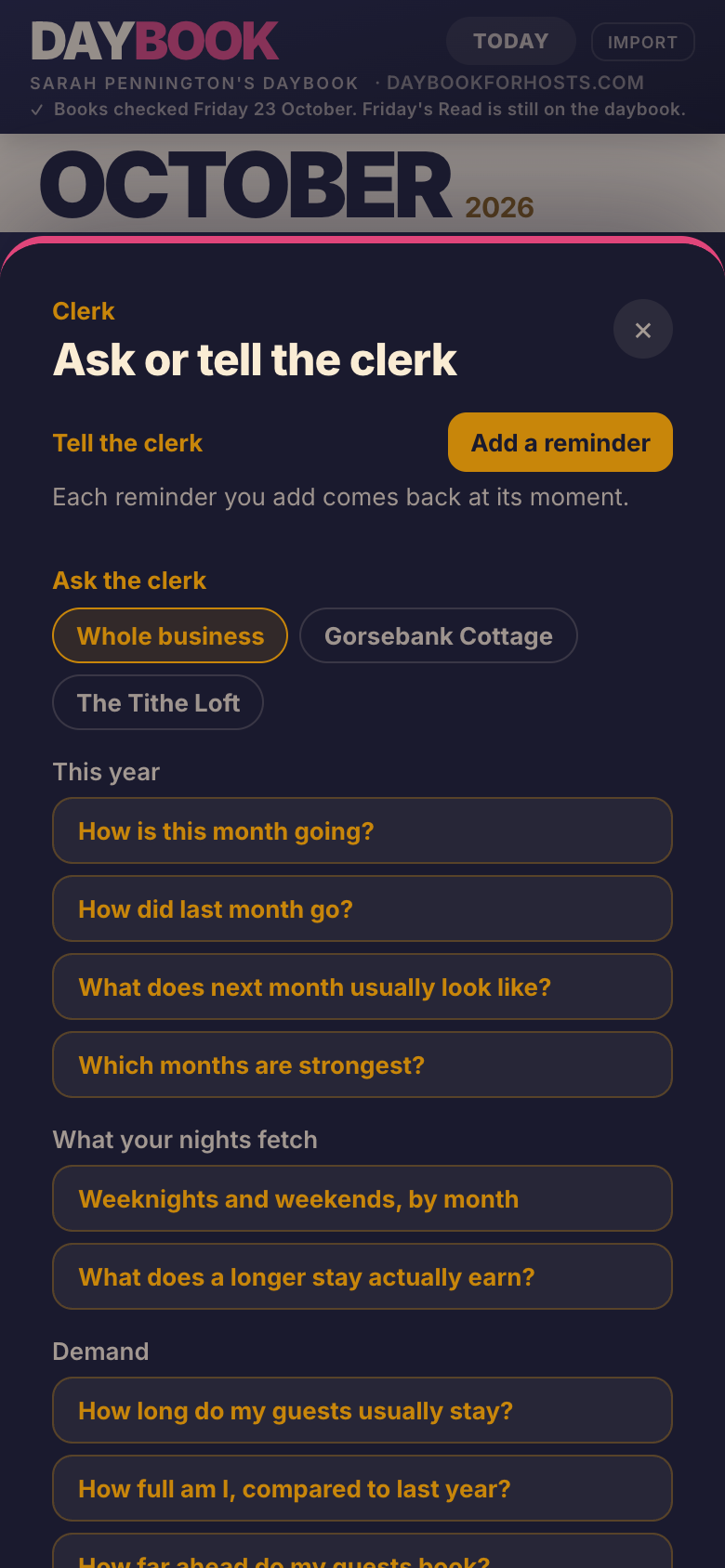
Tap Add a reminder and say it or type it: cream for Friday’s guests, the boiler service on Tuesday, new door mats before the next empty week.
The Clerk works out which place you mean from your words, and one tap changes it. It brings it back on Today on the day it’s for. A reminder tied to a booking moves when the booking moves. It stays until you tick it off, however old, and the Friday letter lists what is still open.
The Clerk also answers a fixed list of questions about your bookings and your figures, each from your own records and saying what it is based on. It doesn’t keep a shopping list for you or do anything you didn’t ask it to.
Prepare the next changeover.
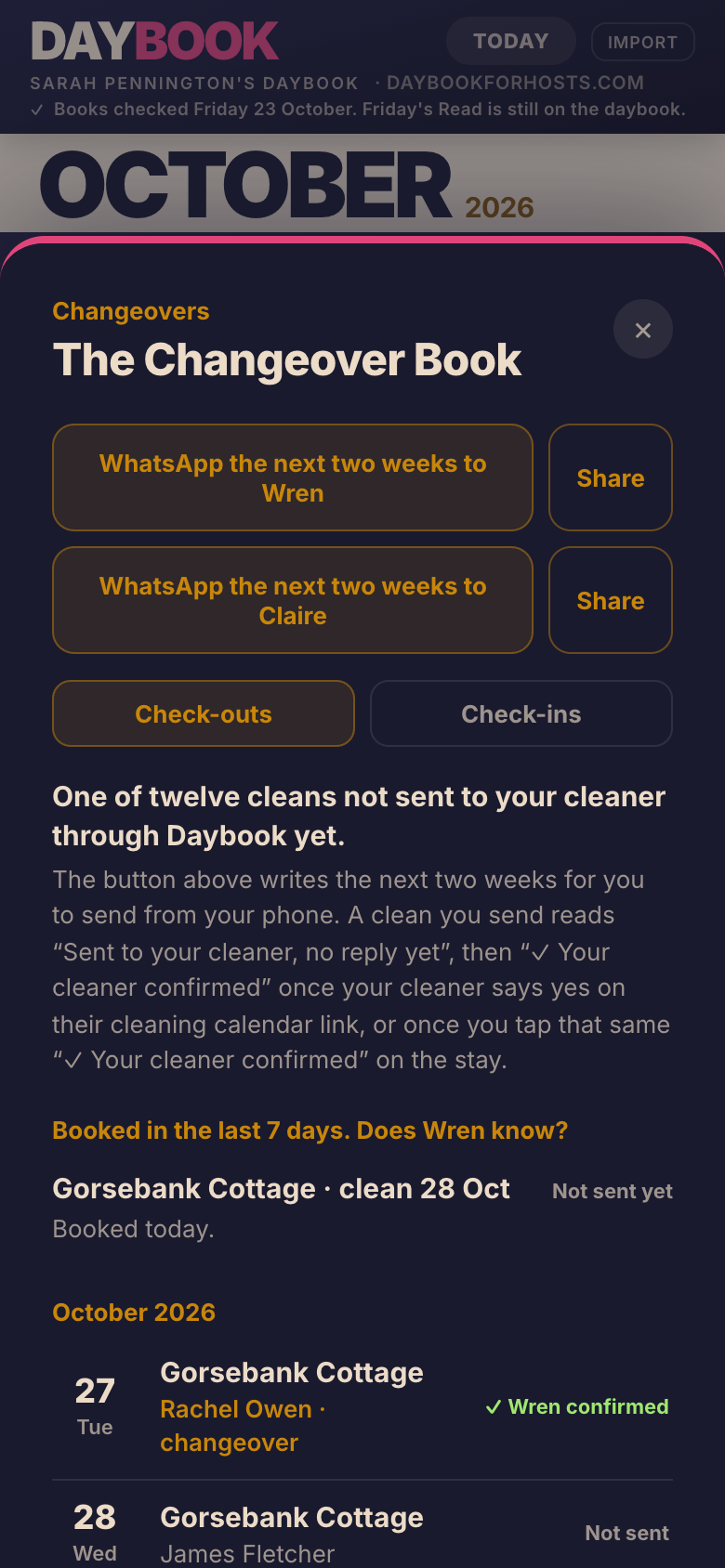
When a booking comes in, Daybook writes the message for your cleaner: which place, which day, what time the guests leave, and a link to their own schedule. You open it in WhatsApp or as a text and send it yourself.
Your board says where each clean stands: the message prepared, sent with no reply yet, or confirmed once your cleaner says yes. The Changeover Book lists every checkout and arrival for the next 90 days.
Each stay also has its own guest guide link, written in your words a page at a time.
Come back when you want a clearer view.
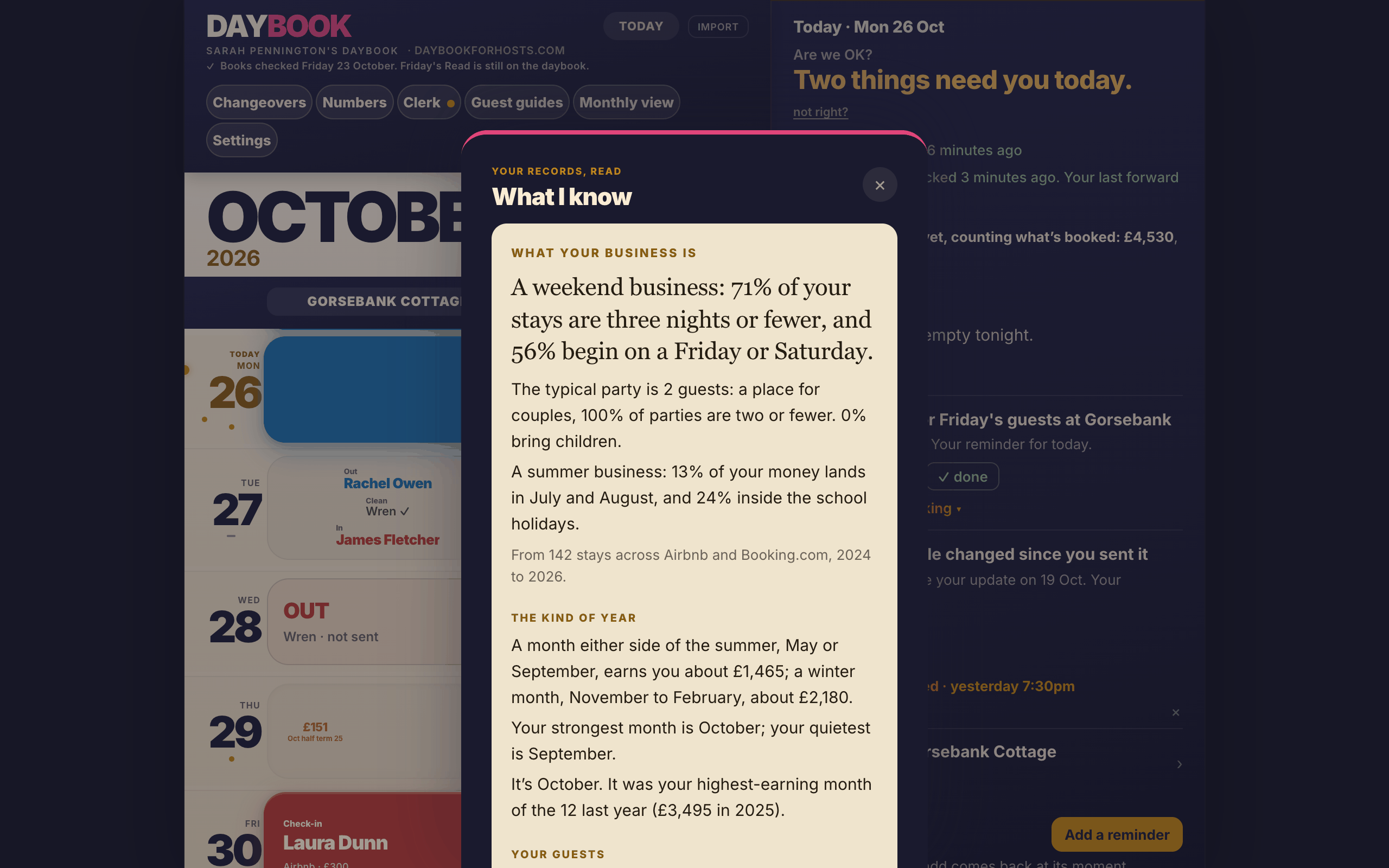
The morning after you upload your past bookings, Daybook writes a first read of your places, “What I know about your place”: your strongest months, your guests, how you price, and what it can’t say yet.
After that, Numbers is there when you want it, the Clerk answers its questions, and a letter on Fridays says where you stand. Nothing here asks for your attention every day. It waits until you come back.
Start with one calendar.
Sign in with your email, name your first place and paste one calendar link. Add the rest when you’re ready; anything you skip waits as one line until you come back to it.
Everything Daybook does today, in detail
Grouped by the jobs in a host’s day. Where something needs a setting from you first, it says so underneath.
Getting set up
Setup asks one thing at a time. Almost all of it can be skipped and finished later in Settings.
- Sign in with an emailed linkNo password. Signing up and signing in are the same form, and the link lasts 15 minutes.
- Setup, one card at a timeYour name, your place, who cleans it, the fees guests pay, your calendar links and your booking emails.
- Calendar links, checked as you pasteAirbnb, Vrbo, Booking.com, and an agency's or channel manager's calendar. A link that isn't a calendar is refused, with the reason.
- Booking emailsForward confirmations to in@daybookforhosts.com from the address you sign in with.
- Your past bookingsUpload a CSV from Airbnb, Booking.com or Vrbo, your own spreadsheet of direct bookings, or a letting agent's statement. You get a receipt of what was read.
- Which place is that?If a file names a listing Daybook can't place, it asks you once and remembers.
- Something you're carryingThe last setup question asks for one thing on your mind about the place. It becomes your first reminder.
- Your private linkYour Daybook has its own address that opens without signing in, so you can keep it as a bookmark.
The morning
One page that answers two questions: do I need to do anything today, and has anything changed since I last looked?
- The answerNothing needs you today. or Two things need you today. It counts the lines under Needs you, and the lines name them.
- The proofCalendars checked 8 minutes ago. If a calendar couldn't be read, the answer becomes Nothing needs you that Daybook can see, and says since when.
- TodayWho leaves and who arrives at each place, with times and your cleaner's state. From 4pm, tomorrow's arrivals too.
- Needs youOnly what is due today, one line each. Tap a line for the detail and the button that deals with it.
- Since you last lookedBookings added and cancelled since your last look on any of your devices, or Nothing's changed since 6:10pm.
- RemindersTap Add a reminder and say it or type it. It is filed against the right place and comes back when its moment does.
- Friday's letterOn Fridays and Saturdays the week's letter sits under the answer, with Read it here.
- Look aheadOn a laptop: the coming days' notes, empty nights, the next arrival and this week's money.
- not right?Tell Daybook when a line looks wrong. It goes to the person who builds Daybook, to look at.
Bookings and calendars
Daybook reads every calendar and checks them against each other. It never changes anything on the sites.
Keep the calendar links you already have between the sites. Also paste Daybook's calendar link into each site, so a booking you take directly blocks every site.
- Every calendar, every five minutesUp to four calendar links per place, side by side on one board.
- Not yet blocked on AirbnbWhen a booking from another site, or one you added, still shows as open on Airbnb four hours later, Daybook names the exact nights to block there. The checkout morning stays open.
- I've checked AirbnbTick it once you've looked. Daybook keeps watching and tells you when the nights appear.
- Vrbo and Booking.com, confirmed onceTheir calendars don't show what they've imported, so Daybook asks you once to confirm each imports its calendar.
- A calendar that isn't copyingWhen Airbnb has never copied another site's bookings, Daybook tells you which import to check.
- Double booking detectedIf two stays at one place share a night, a red banner above the calendar names both guests.
- Blocks left behindA block still covering a booking that cancelled is pointed out, so the nights can go back on sale.
- Double check datesBefore you say yes to a direct booking, Daybook checks every calendar for those nights, then adds the booking if you say yes.
- What these nights usually make youThe same nights in earlier years, lined up by weekday, after the sites' fees.Needs two years of past bookings.
- Daybook's calendar for this placeOne private link per place with every booking Daybook knows about and your own blocks, for your sites to import.Needs a setting: paste the link into each site's calendar import.
- Add a booking or a blockA direct booking with the guest's name and total, or a block with a reason: maintenance, family stay, owner use.
- The booking cardEverything about a stay: where the name came from, your income after commission or why there isn't one, your cleaner's state, your notes and a timeline.
- Where was it booked?For a stay that came through your own calendar, tell Daybook the site once and it remembers.
- Notes on a dayTap a date to leave a note. It shows as a gold dot, and on the morning itself.
- Monthly ViewTwelve months at a glance, with your longest clear run, for when you want to get away.
- Bank holidaysEngland and Wales bank holidays are marked on the calendar.
The clerk
The part of Daybook that reads, files and remembers, and says only what it can show you.
- Reads your booking emailsAirbnb, Vrbo and Booking.com confirmations, changes and cancellations become stays on your board, with the guest's name and the money.Needs your booking emails forwarded.
- Files what you tell itA reminder is filed by plain rules: the place, the kind of note, any cost, and when it should come back.
- Moments that follow the calendarNext changeover, next arrival, when it's empty: if a booking moves, the reminder moves with it.
- The Operations LedgerEvery reminder in your own words, with the place, when you said it and why it is dated as it is. Finished ones are kept as history.
- File a booking note with the clerkHand a note on a booking to the clerk and it comes back at that stay.
- A check on your settingsWhen a booking email shows a different cleaning fee or Airbnb fee from your Settings, Daybook shows both and lets you change it or mark the email as a one-off.Needs your booking emails forwarded.
- Ask the clerkA fixed list of questions about your business, each answered from your own records and saying what it is based on.
Cleaners
Daybook writes the message and keeps the record. You send every message yourself.
- A message ready for each bookingTap Tell Jo and the message opens in WhatsApp or as a text, with the place, the day, the checkout time and Jo's own link.Needs your cleaner added, with how you message them.
- Who knows whatMessage prepared for Jo, then Sent to Jo, no reply yet, then Jo knows once Jo confirms.
- Schedule changesWhen cleans are added or no longer needed since your last message, Daybook writes the update for you to send.
- The Changeover BookEvery checkout and arrival for the next 90 days, with same-day changeovers marked and who has confirmed.
- Two weeks in one messageWhatsApp the next two weeks to Jo, or share it to a group chat.
- Jo's own pageEvery clean coming up at your places, with your notes for each place and a Confirm job button. No guest names, codes or prices, no app and no password.
- Notes for the cleanerThings they need every visit, shown on every job at that place.
- For the cleaner's paperworkTheir page also keeps a mileage log, expenses with receipt photos, and a tax-year CSV export.
- In their own calendarJo can subscribe to their cleans in their phone's calendar app.
- One cleaner or severalEach place has its own cleaner. If your agency arranges the cleaning, Daybook keeps quiet about it.
Guests
A guest guide for each place, written in your words one page at a time.
- The guide editorWelcome, the place, Getting here, house rules, questions guests ask, room by room, once they're in, places you love, just in case, checkout. It saves as you go.
- Getting here as photo stepsThe way in as a row of photos guests swipe through, then how they get in, with the code and a Copy button.
- Your area guide as a PDFUpload it and guests open it as it is, under Our area guide.
- Bring in your placesFrom a Word file, PDF, text or a link, Daybook reads out your places for Places you love, and you tick what to keep.
- Start me offWith no guide yet, answer a few questions and get a first draft to change.
- Places you loveEach with why you love it, grouped by area, with a map link. Your words are never rewritten.
- Their guide linkEach stay's card on your board has its own guide link. Tap Copy link and paste it into your message to the guest. The door code and WiFi show from 2 days before they arrive until they leave on checkout day.
- The door-card linkYour place's own link, for the card by your door with its QR code and for the guide printed as a book. It never shows your door code; guests get that from their own link. The WiFi password shows only during a stay. On the guide's Share it page, Copy the door-card link copies it.
- Stop this linkOn a stay's card, or for your place's own link, Stop this link and it stops working straight away. Make a new link gives your place a fresh one; print the door card again after.
- Coming back?At the end of Checkout, guests on a direct booking can leave their email to hear when dates open. It shows only on bookings you took directly, never to Airbnb, Vrbo or Booking.com guests.
- Know when they're inYour board reads Likely in: they opened the WiFi details at 4:12pm, then They're in, confirmed at 4:20pm once they tap Yes, we're in.
- Know when they've goneWe've checked out puts Guests have left at 10:05am on your board, so the clean can start.Needs the Checkout page filled in.
- A note for one stayWrite a welcome note on a booking and it shows at the top of that place's guide during their stay.
- Your own guest messagesSave your messages once. Daybook fills in the guest's name and dates for a booking and copies it for you to paste.
- Checkout tasksGuests tick off what you'd like done before they leave.
- Works offlineOnce a guest has opened the guide, it still opens with no signal.
Money and Numbers
What your places have earned, against last year, with the working shown. Never a price to charge.
- This month against last yearWhat you've earned so far and nights booked, against the same date last year, and why it moved: more nights, or each night earning more or less.
- What these numbers stand onHow many stays your files hold, from which sites and years, and how many carry your income after commission. Nothing is estimated.
- Why Daybook says thisOpen it under any verdict to see the working, or the reason Daybook won't say.
- Next month is comingFrom 24 days before, how much of next month is sold against where you'd usually be.
- Ask the clerkEleven questions, from How is this month going? to How far ahead do my guests book?
- Gaps to fillThe open nights coming up, with what nights like them earned you last year.
- Empty nights on the calendarEach shows what that kind of night earned for the room that month last year. Tap it for how many sold and whether that night did.Needs your past bookings.
- What I know about your placesA first read the morning after you upload your past bookings: your best months, your guests, how you price, and what Daybook can't say yet.Needs your past bookings.
- The Friday letterEvery Friday, where you stand, what Daybook took care of and noticed, and what it couldn't see. Every past letter is kept.
- The month closedEarly each month, the letter puts last month in the books and sets up the month ahead against last year.
- Figures that are trueThe cleaning and pet fees guests pay and each site's cut come off before a night's earnings are shown.Needs your fees, asked during setup and kept in Settings.
- How Booking.com pays youTell Daybook once, and each Booking.com guest price becomes your income after commission.Needs a setting in Settings.
- CostsWhat a changeover costs you, so Daybook can show what a stay kept.
Trust
What Daybook won't do, and how it tells you when it can't see.
- Reads, never writesIt never logs in to Airbnb, Vrbo or Booking.com, and never changes your availability or prices.
- Never sends for youNo message goes to a guest or a cleaner unless you send it. The only email Daybook sends is your sign-in link.
- Never tells you what to chargeIt shows what your nights earned and leaves the price to you.
- Says when it can't seeA calendar it couldn't read, booking emails that aren't being read, or Daybook's own checks stopping: each is said on the board in words.
- Keeps the last good pictureA calendar that fails or suddenly comes back empty keeps the bookings it last read, rather than showing the place as empty.
- Says where each fact came fromFrom your confirmation email, appeared on your calendar on a date, first seen on Vrbo 9 hours ago.
- Your private link, replaceableYour private link opens your Daybook without a password, so keep it to yourself. If it is shared by mistake, Replace my private link in Settings and the old one stops working.
- Your records stay yoursEach host's records are kept apart. It is never sold and never used for advertising.
Your holiday lets deserve a clearer view.
One business, however many places the bookings come from.
Free for 14 days, no card. Then £15 a month. The first 50 hosts who pay become Founding Hosts and keep £15 a month for as long as they stay.