One page that tells you what needs you today
Open Daybook and the answer is at the top: how many things need you today. Under it, the day itself, then anything that changed since you last looked.
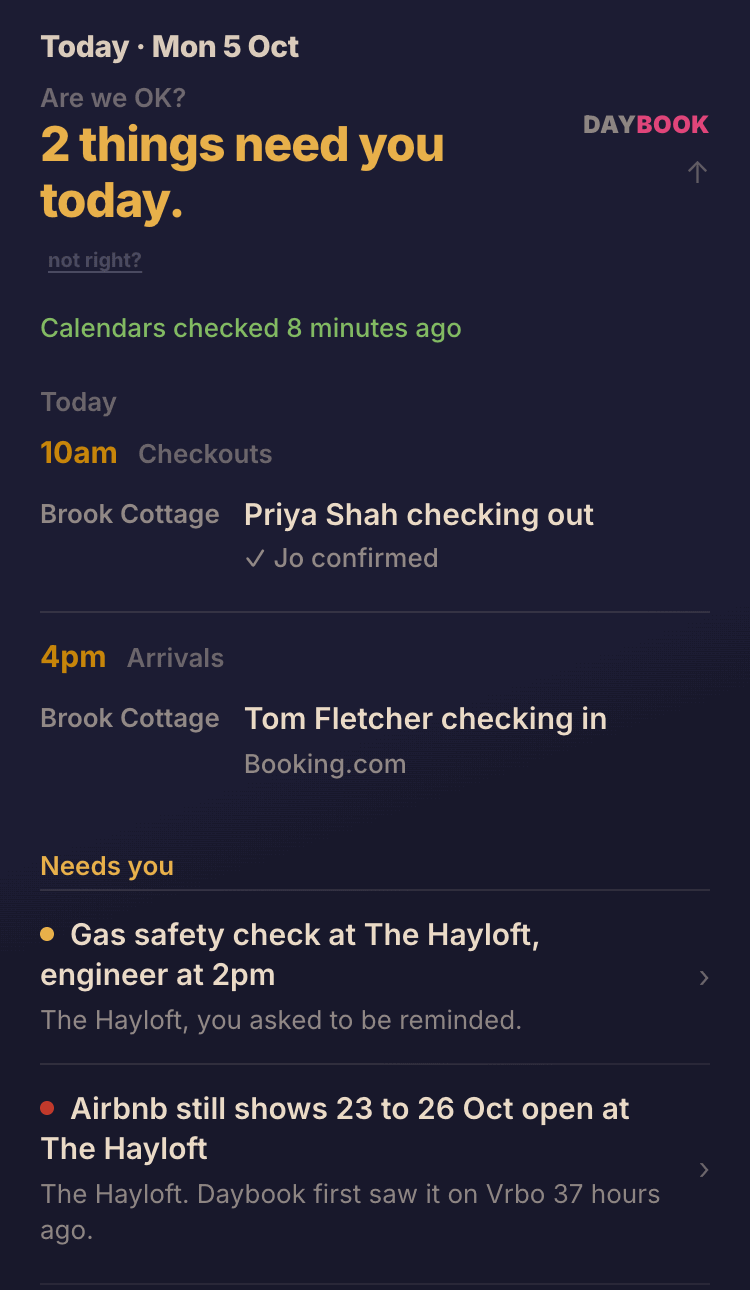
What's on the page, and why it's there
On a phone, the page holds only what matters today. Each line opens on a tap if you want the detail.
The answer
You're all set. or 2 things need you today. It is a count of the lines under Needs you. On a day with a guest arriving and nothing else, it says One arrival today.
The proof under it
Calendars checked 8 minutes ago. If a calendar couldn't be read, the answer changes to Nothing needs you that Daybook can see. and says since when, rather than showing you a calm page it can't vouch for.
Today
Who leaves and who arrives at each place, with the times, and whether your cleaner has replied. From 4pm it adds tomorrow's arrivals.
Needs you
Only what is due today, one line each: a reminder you left yourself, a booking Airbnb still shows as open with the nights to block, a cleaner whose schedule changed since you last sent it. Tap a line for the detail and the button that deals with it.
Since you last looked
Bookings added and cancelled since you were last on Daybook, on this phone or your laptop, each with a button to tell your cleaner. If nothing has changed, it says so: Nothing's changed since 10:12pm.
Reminders
Tap Add a reminder and say it, or type it: the boiler service on Tuesday, towels before the next changeover. Daybook works out which place you mean and brings it back when its moment comes. If the booking it hangs on moves, the reminder moves with it.
Friday's letter
On Fridays and Saturdays, a line from the week's letter sits under the answer, with a link to read the rest.
Look ahead
On a laptop there is room for the coming days as well. On a phone the calendar is right below.
About the morning view
Which sites does it read?
Airbnb, Vrbo and Booking.com, and the calendar from an agency or channel manager if one takes bookings for you. It also reads the booking confirmation emails you forward, which carry the guest's name and what they paid.
Do I need booking history for it to work?
No. The morning view works from your calendars alone. Your past bookings are for Numbers.
Is there an app to download?
No. Daybook opens in your phone's browser. Your Daybook has its own private address that opens without signing in, so you can keep it as a bookmark.
What if something on the page looks wrong?
Tap not right? under the answer and say what you see. It is recorded for the person who builds Daybook to look at.
See your own morning in Daybook. You don't need a card.
£15 a month after the free trial, everything included. The first 50 hosts who pay become Founding Hosts and keep £15 a month for as long as they stay.